YOU SCAN IT YOURSELF, WITH YOUR OWN IPHONE
Create an account, scan a dish, print a code.
The VuPlate app is free and scans with no limit. An account in this panel gives your dish its own QR code, the one a guest scans at the table and sees the portion at true size on their own table.
You create the account yourself, no sales call and no card. Active right away.
Scanning requires an iPhone 15 Pro, 16 Pro or 17 Pro.
FROM ZERO TO A QR CODE ON YOUR TABLE
Five steps to a QR code on your table
No onboarding, no deadline, no salesperson. You scan with your own phone, the 3D model builds itself, and you end up with a file ready to print. Start with an account, active right away.
Create an accountTakes a minute. No card needed.
01
Create an account
The form asks for your business name, a contact person, phone, city and email. No card, no invite code, no call. Your account is active right away, you can log in the same moment.
You do not have to wait for the rest of the steps. We count the 14-day trial from registration right away, so you can move straight on to downloading the app.
Create an account02
Download the VuPlate app
Free, no in-app purchases, no scan limit. You do not need to log in just to scan. Logging in is only needed when you send the finished model to the panel.
You need a newer iPhone Pro, from the 15 Pro model up. Older iPhones and models without "Pro" in the name do not support scanning yet. Don’t have one? Write to us, we’ll figure it out together.
Get it on the App Store03
Scan a dish and put it on your own table
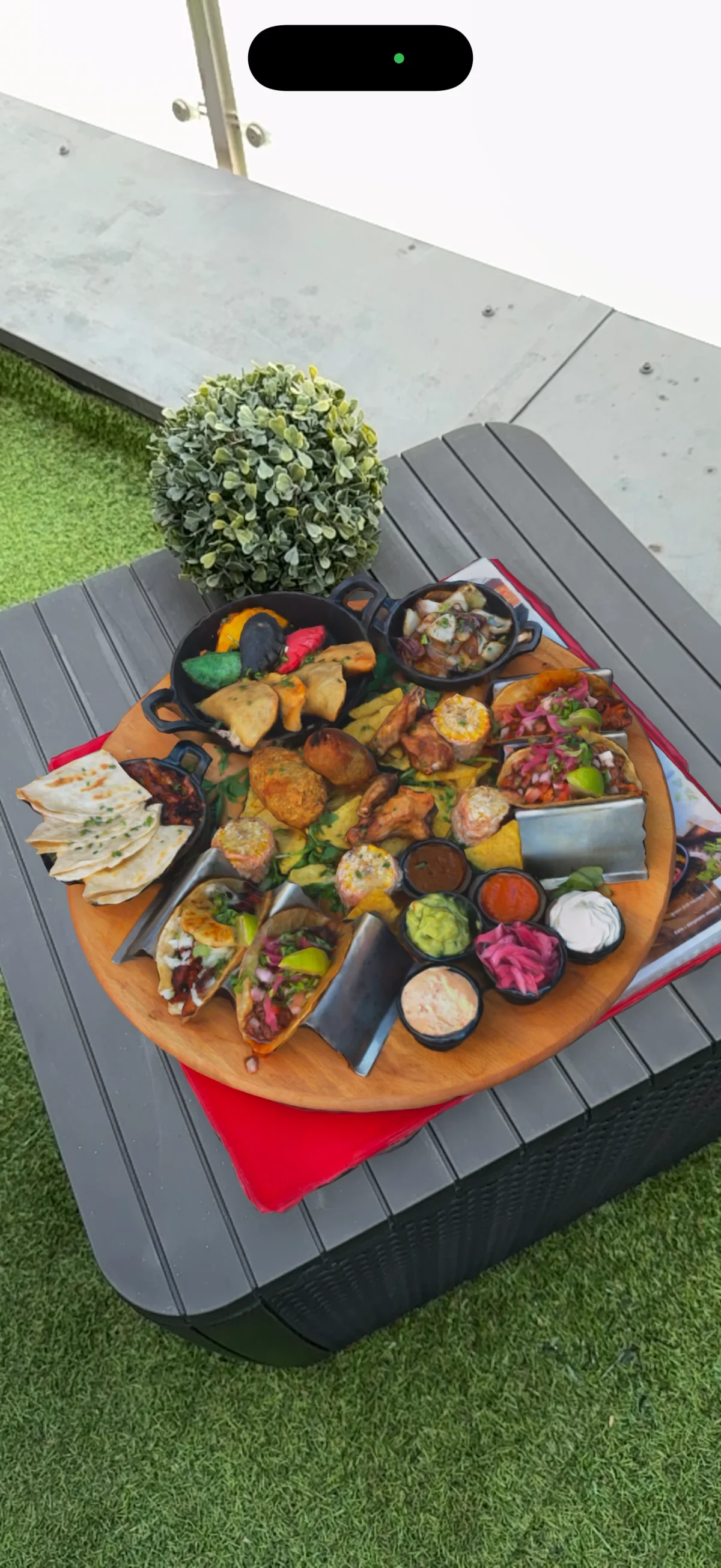
Place the plate on a table and walk the phone around it, slowly, twice. The app guides you through the whole scan. Right after the scan, tap "3D preview" and put your own dish on your own table, at true size, before anyone else sees your QR code.
The scan itself takes about a minute, processing on the phone takes a few to a dozen or so minutes, longer for complex scenes. To be upfront: glossy sauces, glass and soups scan worse. Start with a dish that has a clear shape, for example a burger, ribs, a board, or a bowl with clearly visible contents.
04
Send the model to the panel
In the app, log in with the same email and password as here, pick the saved scan and tap "Upload to panel". The Android version is built automatically on our side. You do not click anything, ask for anything, or wait for anything on your phone.
Scans stay saved in the app, so the order does not matter. You can scan a dish in the evening and send it in the morning.
05
Download the QR code and print it
The dish appears on the list in the panel with its own QR code. You download it as PNG for printing or SVG for your menu layout and hand it to the printer. The code belongs to the dish permanently. Swap in a better model, change how it is presented, and the printed menu stays exactly the same.
Guests do not install an app or create an account. A phone camera, a tap on a notification, and the dish is standing on their table. Works on iPhone and Android.
FOURTEEN DAYS, THEN YOU CHOOSE
One dish is enough to test the whole path
The trial lasts 14 days, counted from registration right away. One dish, one working QR code on the table, and real guests scanning it. That is enough to see if this works for you. No card, no commitment, no call before you decide.
Scanning in the app is free and unlimited, always. The plan only determines how many dishes can have a working QR code for guests at the same time.
THREE PLANS, PRICES WITH NO CATCH
Start
49 EUR /mo excl. VAT
up to 10 · Dishes worth showing off
Menu
99 EUR /mo excl. VAT
up to 25 · The whole menu, not just the flagship dishes
Pro
149 EUR /mo excl. VAT
up to 50 · A large menu, priority support
More than one location? The Chain plan has no dish limit, quoted on a call. Write to us below.
WHAT HAPPENS WHEN YOU CHOOSE A PLAN
1
You pay by card, in the panel, with no contact with us
In the panel you open "Plan and billing", click a plan and land on the Stripe payment page. You pay by card. No calls to make, no offer to wait for, no contract to sign.
2
Your account moves to the chosen plan right away
Once the payment clears, your dish limit rises to whatever you are paying for. This happens automatically, within the same minute, without us doing anything.
3
The invoice arrives by email, automatically
We issue it and send it to the address on your account, without being asked. You fill in your invoicing details (name, tax ID, address) once in the panel, in the "Company details" section, before your first payment.
4
You change or cancel it yourself, whenever you want
You upgrade, downgrade or cancel the plan with one click in the panel, at any time. After cancelling it stays active until the end of the paid period. Billed monthly, no fixed-term contract.
Prices exclude VAT. Billed monthly. One thing worth knowing before you print your table cards: the QR code only shows the dish while the account has a paid plan or a running trial. Once the plan expires, the codes on the tables stop working until you renew.
WHAT YOU KEEP AFTER THE FIRST DISH
Three things you do in the panel
01
Dishes in one place
You add a dish, upload the model from the scan, set a name, description, ingredients and allergens. Guests see all of it after scanning the code, on one page, with no login.
02
QR codes ready to download
Every dish gets its own code. You download it as PNG for printing or SVG for your menu layout and hand it to the printer, with nothing further to do on your side.
03
Scans counted from day one
Every guest opening a dish is recorded from the day the code goes live. A popularity view inside the panel is still being built, but the numbers are already piling up, so on day one you will see history behind you instead of an empty chart.
You open the panel in a browser, on a computer or on a phone. You do not install any app.
QUESTIONS AND CASES OFF THE BEATEN PATH
Have a question, or more than one location?
You create the account yourself, the form is above and you do not need anyone from us for that. This contact form is for everything else: a chain plan with no dish limit, billing and invoice questions, or a situation we did not anticipate.
Leave your contact details, we will get back to you within one business day.